An agent is only as good as the process around it. Give a capable model a vague task and no structure, and you get a confident pull request that solves the wrong problem. Give a modest model a clear workflow with checks between each step, and you get changes you can merge.
This guide is about designing that structure: an AI agent workflow that takes an issue from plan to a reviewed, merged pull request. It covers the core steps, the gates between them, what happens on failure, branching, passing context, triggers and limits. The examples come from how workflows are modelled in Duun, but the ideas apply to any orchestration tool.
Start from the definition of done
Before you add a single step, write down what must be true for a run to count as a success. For a typical bug-fix lane:
- The pull request fixes the behaviour described in the issue.
- A test reproduces the original bug and now passes.
- The full test suite, type checks and linters pass.
- The diff stays within the scope of the approved plan.
- A person has reviewed it.
Every step and gate in the workflow exists to make one of those statements true. If a step does not serve one, cut it. If a statement has no step guaranteeing it, you have found a gap.
The four core steps
Almost every code-change workflow is a variation on four steps.
1. Plan
The agent reads the issue, explores the relevant code and writes a plan: the approach, the files it expects to touch, the tests it will add and any risks or open questions.
Good plan steps have explicit done criteria: “The plan names every file to be changed and at least one test that will fail before the fix.” They also declare outputs that later steps can use, such as a summary, the list of files and the test command.
2. Implement
The agent makes the change in an isolated workspace, following the approved plan. Its instructions should point at the plan output directly rather than restating the issue, so implementation is anchored to what was approved.
Keep the implementer’s permissions tight. It needs to edit files and run local commands. It does not need to open pull requests or post in chat.
3. Test
Run the existing suite and the new tests. This step can be fully automated (a check that runs your CI command) or owned by a dedicated tester agent that writes additional cases and investigates failures. Many teams do both: an agent writes tests, then a deterministic check runs everything.
4. Review
Review compares the diff to the plan and to your standards. An agent reviewer is good at catching mechanical problems: missing tests, unrelated changes, leftover debug code, a function that grew past your conventions. A person decides whether the change is right.
After review, a deliver step opens the pull request, or merges it when policy allows.
Gates between steps
A gate is a condition on the transition from one step to the next. Choosing the right gate type is most of the design work.
| Gate | Passes when | Use it for |
|---|---|---|
| User approval | A named person approves | Plans, specs, risky changes |
| CI green | A command exits successfully | Tests, builds, type checks |
| Review check | A reviewer, agent or human, approves the diff | Code quality and scope |
| Judgment | An evaluator agrees a written criterion is met | “Diff matches the approved plan” |
| Fact | A verifiable condition holds | “A test file was added under tests/” |
Automated gates are cheap, so use them generously. Human gates cost attention, so place them where a person’s judgment changes the outcome, usually after plan and before merge. We go deeper on that trade-off in How to keep humans in control of autonomous agents.
Design the failure path
Every gate can fail, and what happens next matters as much as the happy path. For each gate, decide three things:
- Where to return. A failing test usually sends the run back to implement, not to plan.
- What to send. Return with feedback: the failing test output, the reviewer’s comments. An agent retrying blind tends to repeat the same mistake.
- When to stop. Set a maximum number of attempts. After two or three failed loops, escalate to a person rather than retrying again.
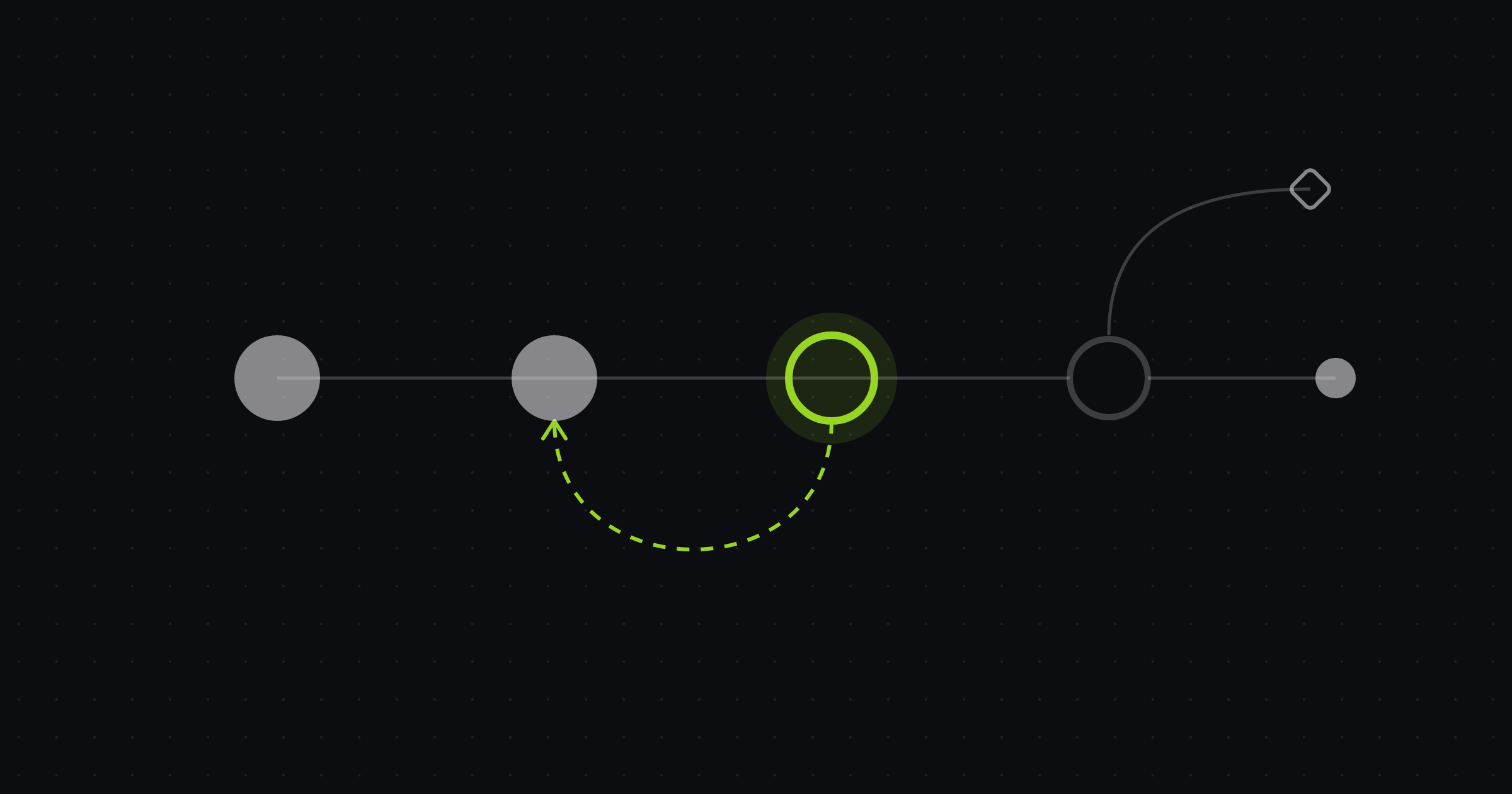
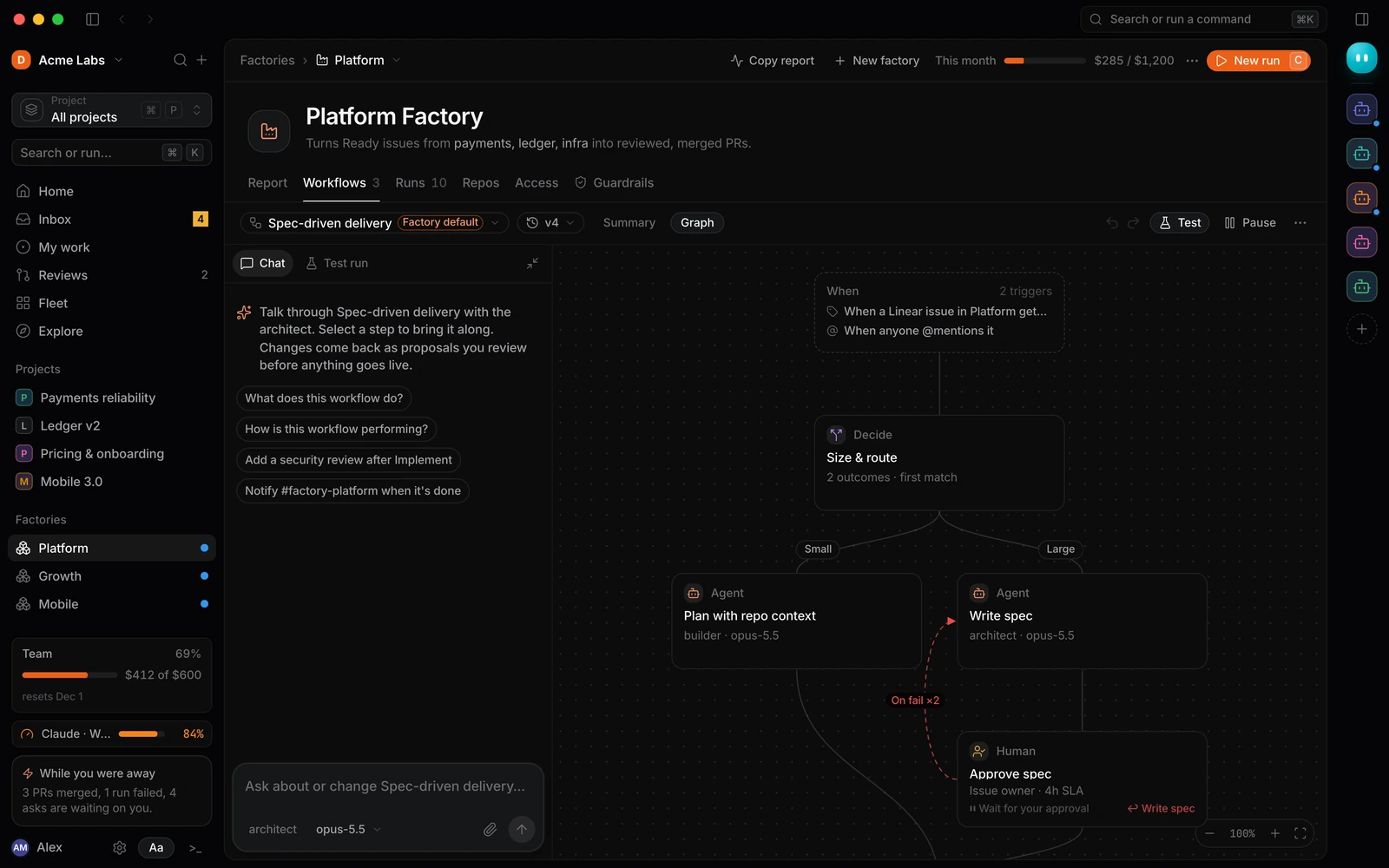
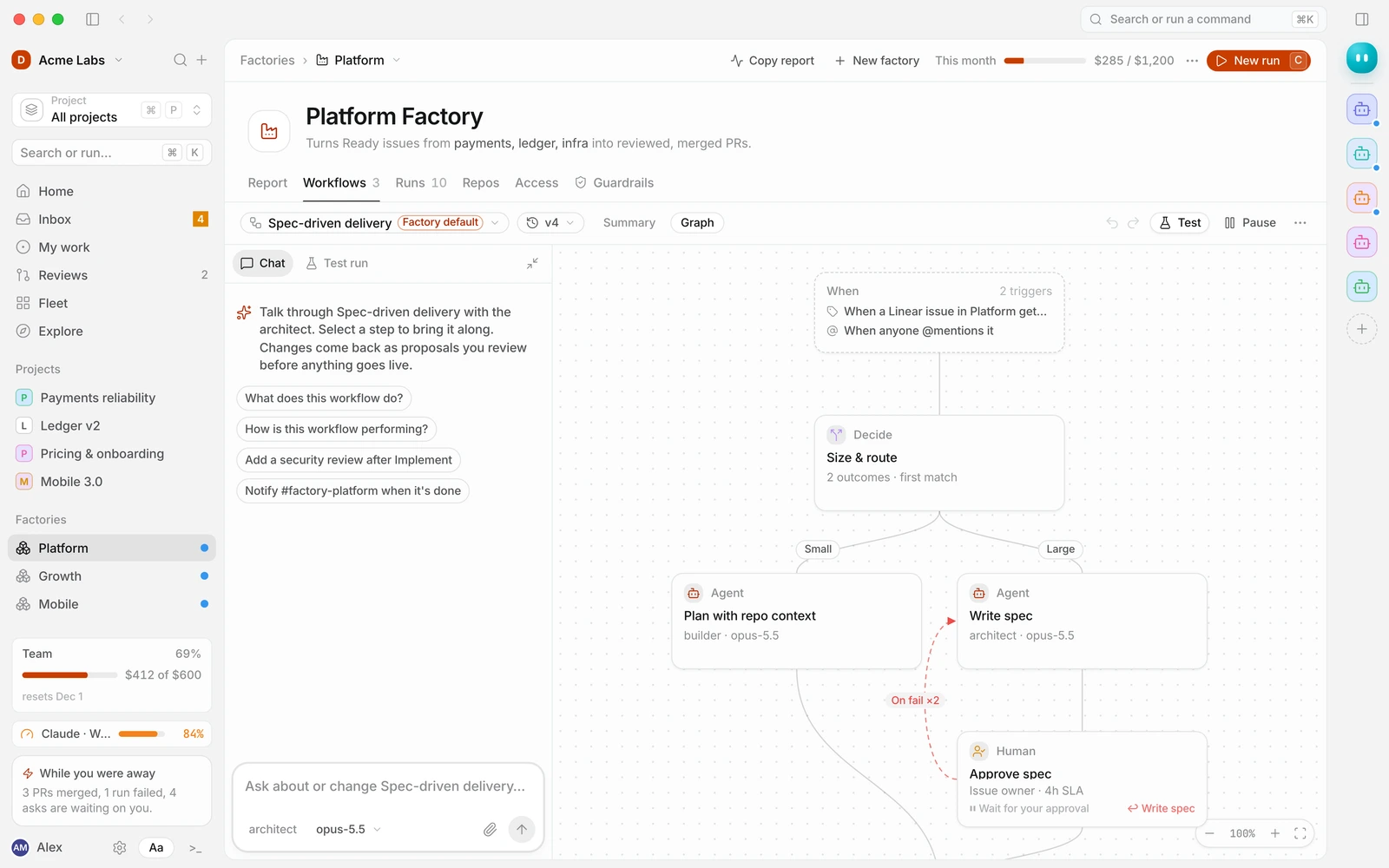
A dashed “on fail” edge back to an earlier step, with a retry count, is the most underrated element in workflow design. Without it, runs either give up too early or loop until they hit a budget.
Branch on size and risk
Not every issue deserves the same process. A decide step early in the workflow routes work by what it is.
A common pattern routes by size:
- Small (one pull request, low blast radius): plan with repository context, implement, test, review.
- Large (multiple files across modules, schema changes): write a spec, have a person approve it, then plan and implement against the spec.
The decision can be a judgment (“Choose Large when the change touches more than one service or alters a database schema”) or a simple expression over a previous step’s output. Either way, label the outcomes clearly. They show up in the run history and are how you debug routing later.
Pass context explicitly
Steps should hand each other structured outputs, not rely on a shared chat history. If plan declares outputs such as summary, files and test_command, then implement can reference {{steps.plan.output.summary}} and test can run {{steps.plan.output.test_command}}.
Explicit references have two benefits. They make the workflow readable, because you can see exactly what each step depends on. And they can be validated before a run starts: a reference to a step that has not run yet, or to an output nobody declares, is an error you catch at edit time instead of halfway through a run.
Choose triggers carefully
The trigger decides which work enters the workflow. Common options:
- Issue events: an issue in Linear, GitHub or Jira gets a label such as
agent-ready. - Mentions: someone mentions the factory in a comment.
- Alerts: an error-monitoring alert crosses a threshold. See Turning Sentry errors into fixed pull requests.
- Schedules: a weekly dependency update or a nightly flaky-test sweep.
- Webhooks and manual runs: for anything else.
Start with one narrow trigger. A label that a person applies deliberately is the safest way to begin, because a human has already decided the issue is ready.
Set limits per workflow
Every workflow should carry limits: a maximum spend per run, a timeout, a cap on concurrent runs and a threshold at which a run pauses to ask for more budget. Per-step overrides help when one step, often implementation, legitimately needs more room than the others. See Controlling AI agent spend for how to choose the numbers.
Putting it together
Here is a plain-text sketch of a small bug-fix workflow. It is illustrative rather than an exact configuration format.
trigger: issue labelled "agent-ready" in team Platform
limits: { budget_per_run: $5, timeout: 45m, max_concurrent: 3, pause_at: 80% }

steps:
  - plan:        agent builder, outputs [summary, files, test_command]
                 gate: user approval (issue owner)
  - implement:   agent builder, follows {{steps.plan.output.summary}}
  - test:        check, runs {{steps.plan.output.test_command}} and the full suite
                 on fail: return to implement with output, max 2 attempts, then escalate
  - review:      agent reviewer, judgment "diff matches the approved plan"
                 on fail: return to implement with comments, max 1 attempt
  - deliver:     open pull request, request review from CODEOWNERS

rules:
  - "Never edit files under infra/" (block)
  - "Every bug fix includes a regression test" (check)
Test the workflow before turning it on
Treat a workflow like code. Version it, review changes as a diff and test it before it goes live. A dry run walks the graph with simulated results so you can see the path a run would take, which catches broken references and unreachable steps. A test run on a real, low-stakes issue shows how each step actually behaves. Only then switch the trigger on.
When you change a live workflow, apply it as a new version. Runs already in flight finish on the version they started with, and you can compare results across versions.
Common mistakes
- No plan step. Reviewing a diff without knowing the intended approach is slow and error-prone.
- Gates that only check the happy path. Every gate needs a failure route and an attempt limit.
- One giant agent step. “Fix the issue” as a single step hides where things go wrong. Split it so failures are visible.
- Implicit context. Relying on conversation history instead of declared outputs makes workflows fragile and hard to debug.
- Starting too broad. A trigger that picks up every new issue will find the ones your workflow cannot handle.
Frequently asked questions
What is an AI agent workflow?
A defined sequence of steps, such as plan, implement, test and review, each owned by an agent, a check or a person, with gates that decide when work moves forward and what happens when it fails.
How many steps should a workflow have?
As few as it takes to guarantee your definition of done. Four or five steps covers most code-change lanes. Add steps when you can name the failure they prevent.
Should the same agent do every step?
It can, but separating roles helps. A reviewer that did not write the code is more likely to catch problems, and narrower permissions per step reduce risk.
How do I know if a workflow change helped?
Compare runs across versions: the share that end in a merged pull request, where runs fail, how often they escalate to a person and what each merged change costs.
Build your first workflow
The Duun docs cover each piece in detail: steps, gates, decide and outcomes, references, triggers, limits and test runs. Build your first factory to try it end to end. Duun is in early access: request access to try it.